
Klarna: Smarter everyday money
Klarna Bank AB (publ)Shopping
4.859.69K Reviews
- Version
- 26.45.331
- Installs
- 50.00M
- Age Rating
- Everyone
Screenshots
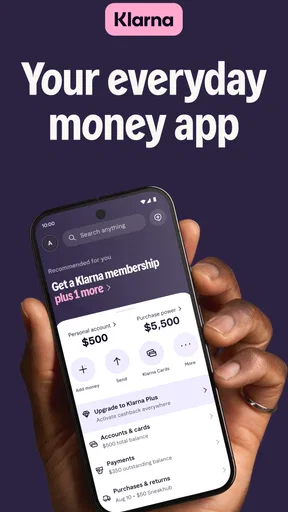
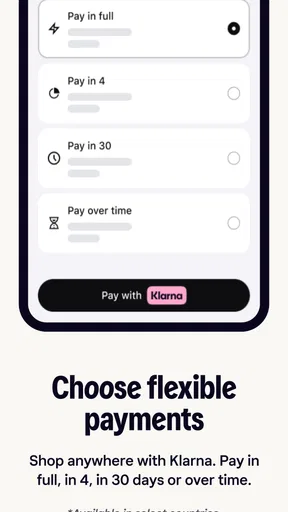
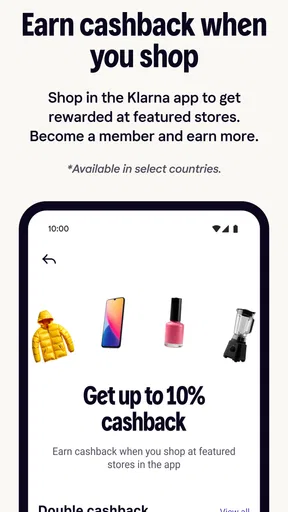
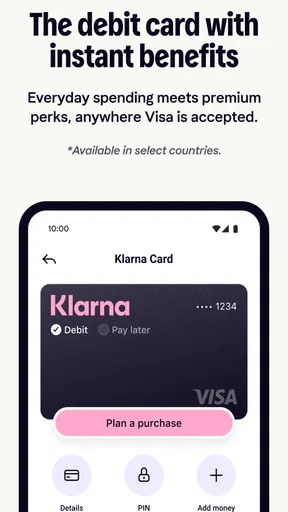
Our Review of Klarna: Smarter everyday money
 Analysis by Appyee
I think the most useful way to understand Klarna is as a shopping companion that puts payment management alongside browsing. Rather than opening a separate service only when a bill is due, you can use the app to explore purchases and keep an eye on payments in the same place. That combination is convenient, but it also makes a little discipline important: a smoother checkout does not make a purchase less expensive.
One place to browse and manage payments
Klarna is a free shopping app from Klarna Bank AB (publ), and its central appeal is connecting shopping with payment tools. In practice, that can make it easier to keep track of what you are considering and what you need to pay, instead of relying on a store’s checkout page, email receipts, and a separate banking app for every step.
The distinction matters most when you shop across different retailers. A store’s own app is usually best for that store’s stock, order details, and customer service. A bank app is better for seeing your wider finances. Klarna sits between those uses: it is designed around shopping and payment options, not as a complete replacement for either a retailer’s account or your main banking tools.
I would treat that central view as a convenience, not as a reason to stop checking the details of each order. Before choosing a payment option, look at its due dates and terms in the app, then make sure the same dates fit your budget. A tidy list can help you remember commitments, but it cannot decide whether several purchases are affordable together.
How the payment choice plays out
The app’s pay-over-time options can be helpful when a purchase is planned and the repayment schedule is easy to fit around regular expenses. They are less useful if you are using them to make an impulse purchase feel smaller. I find it sensible to decide what I can spend before browsing, then consider a payment plan only if it serves that plan rather than changing it.
One practical habit is to check the total cost and payment dates before confirming an order, and then review the upcoming payments after checkout. That second check is easy to skip when the shopping flow feels quick. It is also the point where you can catch a commitment that overlaps with another bill or purchase and adjust your plans before it becomes a surprise.
Returns need the same care. A return can change what you owe, but I would not assume that sending an item back instantly settles every payment detail. Keep the retailer’s return confirmation and check the purchase in Klarna until the payment status reflects what happened. That small bit of follow-through is more reliable than treating a return as complete the moment a parcel is posted.
Where it fits in a shopping routine
Picture replacing a household item after it breaks. You compare options, find one that suits your needs, and use Klarna to review the available way to pay. If you already know what you can afford, the app can make the checkout choice and later payment tracking feel more organized. If you are still unsure whether you need the item, a payment option should not be what tips you into buying it.
This is also a useful distinction between shopping tools: price comparison helps answer whether a deal is good, while payment management helps answer how a purchase fits into your cash flow. Neither guarantees the other. I would compare the final price at the retailer, read the retailer’s delivery and return conditions, and use Klarna for the part it handles well—keeping the shopping and payment experience together.
Getting Started with Klarna
First things first, downloading Klarna is a breeze. It’s available on both Android and iOS, and the installation is smooth as butter. Once you’ve got it up and running, you’ll need to create an account. Don’t worry—it’s quick, and the interface is super intuitive, which I appreciate because who has time for complicated setups, right?
Features That Make Klarna Shine
Now, let’s talk features. Klarna is famous for its "Buy Now, Pay Later" option, which is a lifesaver when you’re eyeing that new gadget or must-have fashion piece. You can split your purchase into manageable chunks without any interest if you pay on time. Seriously, it’s like layaway but way cooler.
Another neat feature is the "Pay in 30 days" option. This gives you a month to decide whether you’re truly in love with your purchase. If not, you can return it without the hassle of immediate payments. This flexibility is great for those of us who are a bit indecisive.
Shopping through Klarna is also pretty exciting, thanks to their "Shop Anywhere" feature. You can use the app to shop at any online store, even if they don’t officially partner with Klarna. It’s like having a magic credit card that works everywhere. Plus, there’s a handy price drop alert feature that keeps you updated on sales and discounts. Who doesn’t love a good deal?
Those options are most useful when you treat them as distinct tools rather than interchangeable perks. Splitting a planned expense can make its timing easier to manage; waiting to pay can give you breathing room while an order is on its way; and a price alert can help you decide when to revisit an item. I would still compare the product’s total price before acting on an alert, since a discount only matters if it is the right product at a price you are comfortable paying.
For a less obvious but practical workflow, I would use a short pause between finding an item and completing checkout: save or note the product, compare it with the retailer’s own offer, and then return to Klarna to review the payment choice. This helps separate the appeal of a convenient checkout from the decision to buy. It is especially useful for clothing or household purchases where you may want to check sizing, delivery details, or return conditions first.
Shop Anywhere can broaden where you use the app, but I would not read “anywhere” as meaning every store or every payment option will behave identically. A retailer’s own checkout remains the clearest place to confirm what it accepts and how it handles an order. When shopping through a less familiar retailer, check its returns and customer-service details directly rather than assuming the payment app replaces those steps.
Security and User Experience
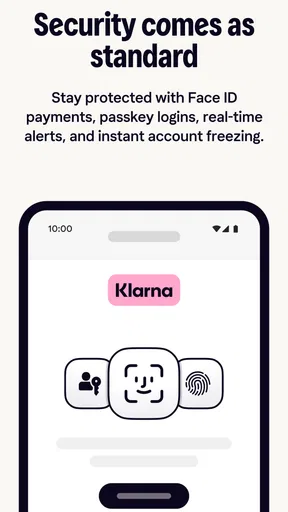
Security is a big deal for me, and Klarna doesn’t disappoint. The app uses bank-level encryption to safeguard your personal information. Plus, they offer buyer protection, which is reassuring if anything goes awry with your purchase.
The user experience is top-notch. The app’s design is sleek and modern, making navigation a breeze. Whether you’re tech-savvy or not, you’ll find it super user-friendly. I also love the personalized shopping recommendations based on your browsing habits. It’s like having a personal shopper who actually listens.
Recommendations can make discovery convenient, but they can also keep tempting products in front of you after you have already finished shopping. I would use the browsing side with a purpose—looking for a specific item or checking an alert—rather than treating every suggestion as a reason to open my wallet. If you prefer a quiet, utility-only finance app, a shopping feed may feel like clutter rather than a benefit.
The same goes for security and buyer protection: they are reassuring parts of the experience, not a substitute for checking an order. I still keep the retailer’s order confirmation and use its support channel for delivery or product issues, while checking the app for the payment side. That division of responsibility makes the app more useful and avoids expecting one service to solve every problem around a purchase.
Who gets the most from it—and who may not
Klarna is a strong fit for people who shop online regularly, want payment choices in the same app as shopping, and are comfortable keeping track of scheduled payments. The app is also worth considering if you like browsing across retailers and want a central place to revisit purchases. Its audience is broad: it has an Everyone content rating, a 4.8 average from around 1.5 million ratings, and more than 50 million installs.
I would be more cautious if you find instalment plans difficult to track, tend to buy more when checkout feels effortless, or want one app to show your complete financial picture. In those cases, paying directly through a retailer or your bank may be simpler. Klarna’s appeal is the shopping-and-payment connection, not a promise that every user needs another way to buy.
It is also worth remembering that available payment choices can depend on the purchase and checkout context. I would not build a budget around assuming the same option will appear every time. Check what is actually offered for the order in front of you, and choose only after you know how it fits alongside your other expenses.
On Android, the current release is 25.50.403 and the minimum operating system is Android 9. The app first arrived on November 1, 2018, so it is an established shopping service rather than a new experiment. Those details are useful when deciding whether your device can run it, but they do not change the basic question: will combining shopping and payment management make your routine clearer or encourage extra spending?
The Verdict
So, is Klarna worth downloading? In my book, absolutely. It’s convenient, flexible, and offers plenty of features to make online shopping less of a financial burden. Whether you’re a shopaholic or just someone who likes to spread out their payments, this app is a game-changer.
I would soften that recommendation for anyone who already has a straightforward way to pay and does not want shopping suggestions or payment plans in the same place. For them, the retailer’s checkout and their usual card or bank app may involve fewer decisions. Klarna makes more sense when its consolidated shopping workflow solves a real annoyance, not simply because another payment method is available.
Ready to give Klarna a whirl? You can grab it from the App Store or Google Play and start enjoying a smarter way to shop today. Happy shopping, and remember, spend wisely!
My practical advice is to begin with one planned purchase, inspect the payment schedule before confirming it, and check the app again after the order and any return. If that makes your spending easier to follow, Klarna may earn a place in your routine. If it makes you browse longer or take on payments you would otherwise avoid, stick with the simpler payment method. That is the difference between a useful shopping tool and an unnecessary nudge.
Privacy and Permissions
See what permissions an app requests and how it handles your data.
- Contacts
- read your contacts
- Location
- approximate location (network-based), precise location (GPS and network-based)
- Phone
- read phone status and identity
- Photos/Media/Files
- read the contents of your USB storage, modify or delete the contents of your USB storage
- Storage
- read the contents of your USB storage, modify or delete the contents of your USB storage
- Camera
- take pictures and videos
- Microphone
- record audio
- Wi-Fi connection information
- view Wi-Fi connections
- Device ID & call information
- read phone status and identity
- Other
- view network connections, pair with Bluetooth devices, access Bluetooth settings, change network connectivity, control flashlight, full network access, change your audio settings, control Near Field Communication, run at startup, control vibration, prevent device from sleeping
Verdict
Strengths of Klarna: Smarter everyday money
- User-friendly interface makes navigation simple.
- Flexible payment options for all purchases.
- In-app financial insights and budgeting tools.
- Seamless integration with multiple retailers.
- Strong security measures for safe transactions.
Limitations of Klarna: Smarter everyday money
- Limited availability outside major markets.
- Occasional app crashes reported by users.
- Some features require account verification.
- Fees may apply for late payments.
- Customer support response times vary.
Similar Picks in This Category
View All
SHEIN-Shopping Online
Roadget Business PTE. LTD.4.8

Amazon Shopping
Amazon Mobile LLC4.4


Mercado Libre: Compras online
Mercado Libre4.8

Wish: Shop and Save
Wish US Holdings LLC4.7

Alibaba.com - B2B marketplace
Alibaba Mobile4.4
You May Also Like
View All

Frequently Asked Questions
What is Klarna and how does it work?
Klarna is a financial app that allows users to shop online and pay for their purchases in flexible ways. It offers options like paying immediately, in installments, or within 30 days. Users link their bank account or credit card to Klarna, which then manages the payment schedule and reminders.
Is Klarna safe to use for online shopping?
Yes, Klarna is considered safe for online transactions. It uses industry-standard encryption to protect user information and transactions. Additionally, Klarna is regulated by financial authorities, adding a layer of security and trust for its users. Always ensure you’re shopping on secure websites for extra protection.
Are there any fees associated with using Klarna?
Klarna typically does not charge fees for its basic services, like paying within 30 days or in installments. However, late fees may apply if you miss a payment deadline. It’s important to review Klarna’s terms and conditions for any specific fees that could apply to your purchase or region.
Can I use Klarna in physical stores, or is it online only?
Klarna can be used both online and in some physical stores. Many retailers accept Klarna as a payment method in-store, allowing you to use the app for flexible payment options. Check Klarna’s website or app to see a list of participating retailers near you.
What should I do if I encounter issues with a Klarna payment?
If you experience any issues with a Klarna payment, contact Klarna’s customer support for assistance. They offer help through their app, website, or phone. It’s helpful to have your transaction details ready to expedite the resolution process. Klarna also provides a dispute resolution service for any transaction disputes.
